After you prepare the environments, run Cloud Migration Setup from the destination Business Central online environment. This task establishes the connection and pipeline between the on-premises and online tenant databases. It also creates any selected companies that don't already exist in the destination. It doesn't replicate business data.
Cloud migration setup flow
The following figure illustrates the flow of the cloud migration setup:
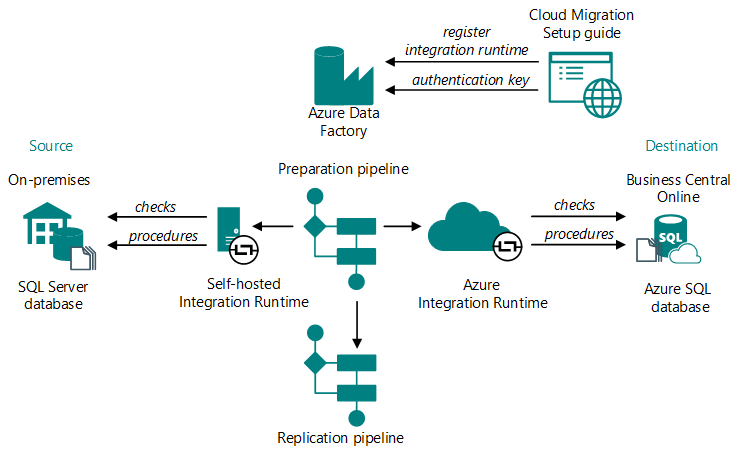
The following steps detail the phases in the process:
Run the Cloud Migration Setup and specify:
- SQL database connection (SQL Server or Azure SQL Database) and the SQL connection string.
- The integration runtime to use. Use an existing instance or install a new one with an autogenerated authentication key.
If you're setting up a new self-hosted integration runtime, register it with Azure Data Factory by using the authentication key.
There are several Azure Data Factories available. Load balancing automatically selects the factory from available options.
A preparation pipeline is created:
- Checks compatibility between the source and destination databases (for example, compatibility levels and versions).
- If checks succeed, creates stored procedures on both sides.
- Retrieves a list of companies from the source database and extensions installed on the destination.
- Creates a list of tables to be migrated and their copy methods.
A replication pipeline is created based on the previous step's information.
This pipeline copies the data and remains idle until you initiate replication.
The environment is marked as ready for migration, and the preparation pipeline is deleted.
After completing one or more replication runs, run the data upgrade if you're migrating from an earlier major version, then complete the migration. Migration from the same major version doesn't require a data upgrade.
Cloud migration setup telemetry
If telemetry is enabled, view data about the success or failure of cloud migration operations like setup, data replication, and data upgrade. Learn more in Enable environment telemetry and Analyzing cloud migration trace telemetry.
Next steps
Define cloud migration table mappings (Business Central on-premises migration only)
Complete one of the following tasks depending on the product you're migrating from: