Note
- If you're coming from version 13 or earlier, Business Central Spring 2019 (v14) is a required step to upgrade to the latest version of Business Central. However, mainstream support for version 14 ends in October 2023, and minor updates to the version are no longer available. New customers can't use version 14 in production, but only as a path for upgrading to latest version. Existing customers on version 14 remain supported by Microsoft as defined in the Fixed Lifecycle Policy.
With Business Central, codeunit 1 Application Management is removed and replaced with new System codeunits. No functionality is removed with this change. All system method triggers, event publishers, and their code are moved to other codeunits.
However, this change affects the upgrade process from Dynamics NAV and how you develop from now on.
Overview
The foundation of this change is events - publishers and subscribers. System codeunits don't contain code. They only contain event publishers. Instead of running codeunit 1 and calling respective functions, Business Central Server runs system codeunits. In turn, the system codeunits raise published events. There are various management codeunits that subscribe to these events. Like codeunit 1, these subscriber codeunits contain method triggers and integration event publishers. They can call application functionality and raise events. The following figure illustrates the process:
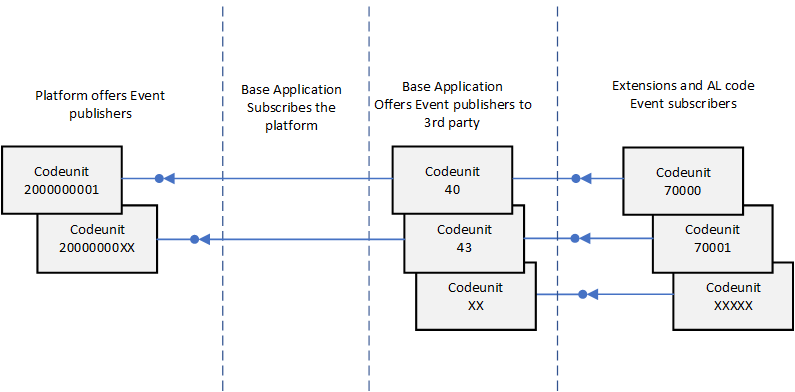
About system codeunits
- They have IDs in the two billion range.
- You can't modify them.
- Currently, we don't recommend that code subscribes to the events in the new system codeunits 2000000001..2000000010 directly. Although not blocked, it might be in a future release. Instead, you should subscribe to one of the integration events.
Mapping Codeunit 1 method triggers to events
The following table lists the mappings between the codeunit 1 triggers and the new method triggers/publishers in the management codeunits.
| Codeunit 1 trigger | New codeunit ID | New codeunit name | New method |
|---|---|---|---|
| CompanyClose | 40 | LogInManagement | CompanyClose |
| CompanyOpen | 40 | LogInManagement | CompanyOpen |
| GetSystemIndicator | 40 | LogInManagement | GetSystemIndicator |
| OnAfterCompanyClose | 40 | LogInManagement | OnAfterCompanyClose |
| OnAfterCompanyOpen | 40 | LogInManagement | OnAfterCompanyOpen |
| OnBeforeCompanyClose | 40 | LogInManagement | OnBeforeCompanyClose |
| OnBeforeCompanyOpen | 40 | LogInManagement | OnBeforeCompanyOpen |
| FindPrinter | 44 | ReportManagement | GetPrinterName |
| ApplicationVersion | 9015 | Application System Constants | ApplicationVersion |
| CustomApplicationVersion | N/A | N/A | |
| ReleaseVersion | 9015 | Application System Constants | ReleaseVersion |
| ApplicationBuild | 9015 | Application System Constants | ApplicationBuild |
| CustomApplicationBuild | N/A | N/A | |
| ApplicationLanguage | 43 | LanguageManagement | ApplicationLanguage |
| DefaultRoleCenter | 9170 | Conf./Personalization Mgt. | DefaultRoleCenterID |
| MakeDateTimeText | 41 | TextManagement | MakeDateTimeText |
| GetSeparateDateTime | 41 | TextManagement | GetSeparateDateTime |
| MakeDateText | 41 | TextManagement | MakeDateText |
| MakeTimeText | 41 | TextManagement | MakeTimeText |
| MakeText | 41 | TextManagement | MakeText |
| MakeDateTimeFilter | 41 | TextManagement | MakeDateTimeFilter |
| MakeDateFilter | 41 | TextManagement | MakeDateFilter |
| MakeTextFilter | 41 | TextManagement | MakeTextFilter |
| MakeCodeFilter | 41 | TextManagement | MakeTextFilter |
| MakeTimeFilter | 41 | TextManagement | MakeTimeFilter |
| AutoFormatTranslate | 45 | AutoFormatManagement | AutoFormatTranslate |
| ReadRounding | 45 | AutoFormatManagement | ReadRounding |
| CaptionClassTranslate | 42 | CaptionManagement | CaptionClassTranslate |
| GetCueStyle | 9701 | Cue Setup | GetCueStyle |
| SetGlobalLanguage | 43 | LanguageManagement | SetGlobalLanguage |
| ValidateApplicationlLanguage | 43 | LanguageManagement | ValidateApplicationLanguage |
| LookupApplicationlLanguage | 43 | LanguageManagement | LookupApplicationLanguage |
| GetGlobalTableTriggerMask | 49 | GetGlobalTableTriggerMask | |
| OnGlobalInsert | 49 | GlobalTriggerManagement | OnGlobalInsert |
| OnGlobalModify | 49 | GlobalTriggerManagement | OnGlobalModify |
| OnGlobalDelete | 49 | GlobalTriggerManagement | OnGlobalDelete |
| OnGlobalRename | 49 | GlobalTriggerManagement | OnGlobalRename |
| GetDatabaseTableTriggerSetup | 49 | GlobalTriggerManagement | GetDatabaseTableTriggerSetup |
| OnDatabaseInsert | 49 | GlobalTriggerManagement | OnDatabaseInsert |
| OnDatabaseModify | 49 | GlobalTriggerManagement | OnDatabaseModify |
| OnDatabaseDelete | 49 | GlobalTriggerManagement | OnDatabaseDelete |
| OnDatabaseRename | 49 | GlobalTriggerManagement | OnDatabaseRename |
| OnDebuggerBreak | N/A | N/A | |
| LaunchDebugger | N/A | N/A | |
| OpenSettings | 9170 | Conf./Personalization Mgt. | OpenSettings |
| OpenContactMSSales | 50 | SaaS Log In Management | OpenContactMSSales |
| InvokeExtensionInstallation | 2501 | ExtensionMarketplaceMgmt | InvokeExtensionInstallation |
| CustomizeChart | 9180 | Generic Chart Mgt | CustomizeChart |
| HasCustomLayout | 44 | ReportManagement | HasCustomLayout |
| MergeDocument | 44 | ReportManagement | MergeDocument |
| ReportGetCustomRdlc | 44 | ReportManagement | ReportGetCustomRdlc |
| ReportScheduler | 44 | ReportManagement | ScheduleReport |
| OnBeforeOpenSettings | 9170 | Conf./Personalization Mgt. | OnBeforeOpenSettings |
| OnAfterGetApplicationVersion | 9015 | Application System Constants | OnAfterGetApplicationVersion |
| OnRoleCenterOpen | 9170 | Conf./Personalization Mgt. | OnRoleCenterOpen |
| OnAfterGetSystemIndicator | 79 | OnAfterGetSystemIndicator | |
| OnAfterFindPrinter | 44 | ReportManagement | OnAfterGetPrinterName |
| OnAfterGetDefaultRoleCenter | 9170 | Conf./Personalization Mgt. | OnAfterGetDefaultRoleCenter |
| OnAfterMakeDateText | N/A | N/A | |
| OnAfterMakeTimeText | N/A | N/A | |
| OnAfterMakeText | N/A | N/A | |
| OnAfterMakeDateTimeFilter | 41 | TextManagement | OnAfterMakeDateTimeFilter |
| OnAfterMakeDateFilter | 41 | TextManagement | OnAfterMakeDateFilter |
| OnAfterMakeTextFilter | 41 | TextManagement | OnAfterMakeTextFilter |
| OnAfterMakeCodeFilter | N/A | N/A | |
| OnAfterMakeTimeFilter | 41 | TextManagement | OnAfterMakeTimeFilter |
| OnAfterAutoFormatTranslate | 45 | AutoFormatManagement | OnAfterAutoFormatTranslate |
| OnAfterCaptionClassTranslate | 42 | CaptionManagement | OnAfterCaptionClassTranslate |
| OnAfterGetGlobalTableTriggerMask | 49 | GlobalTriggerManagement | OnAfterGetGlobalTableTriggerMask |
| OnAfterOnGlobalInsert | 49 | GlobalTriggerManagement | OnAfterOnGlobalInsert |
| OnAfterOnGlobalModify | 49 | GlobalTriggerManagement | OnAfterOnGlobalModify |
| OnAfterOnGlobalDelete | 49 | GlobalTriggerManagement | OnAfterOnGlobalDelete |
| OnAfterOnGlobalRename | 49 | GlobalTriggerManagement | OnAfterOnGlobalRename |
| OnAfterGetDatabaseTableTriggerSetup | 49 | GlobalTriggerManagement | OnAfterGetDatabaseTableTriggerSetup |
| OnAfterOnDatabaseInsert | 49 | GlobalTriggerManagement | OnAfterOnDatabaseInsert |
| OnAfterOnDatabaseModify | 49 | GlobalTriggerManagement | OnAfterOnDatabaseModify |
| OnAfterOnDatabaseDelete | 49 | GlobalTriggerManagement | OnAfterOnDatabaseDelete |
| OnAfterOnDatabaseRename | 49 | GlobalTriggerManagement | OnAfterOnDatabaseRename |
| OnAfterHasCustomLayout | 44 | ReportManagement | OnAfterHasCustomLayout |
| OnAfterReportGetCustomRdlc | 9650 | Edit MS Word Report Layout | OnAfterReportGetCustomRdlc |
| OnBeforeOnDatabaseInsert | 49 | GlobalTriggerManagement | OnBeforeOnDatabaseInsert |
| OnBeforeOnDatabaseModify | 49 | GlobalTriggerManagement | OnBeforeOnDatabaseModify |
| OnBeforeOnDatabaseDelete | 49 | GlobalTriggerManagement | OnBeforeOnDatabaseDelete |
| OnBeforeOnDatabaseRename | 49 | GlobalTriggerManagement | OnBeforeOnDatabaseRename |
| OnEditInExcel | 6710 | OnEditInExcel | |
| OnInstallAppPerDatabase | N/A | N/A | |
| OnInstallAppPerCompany | N/A | N/A | |
| OnCheckPreconditionsPerDatabase | 9900 | OnCheckPreconditionsPerDatabase | |
| OnCheckPreconditionsPerCompany | 9900 | RaiseOnCheckPreconditionsPerCompany | |
| OnUpgradePerDatabase | 9900 | OnUpgradePerDatabase | |
| OnUpgradePerCompany | 9900 | OnUpgradePerCompany | |
| OnValidateUpgradePerDatabase | 9900 | OnValidateUpgradePerDatabase | |
| OnValidateUpgradePerCompany | 9900 | OnValidateUpgradePerCompany |
What does this mean for upgrade?
Full upgrade - application code and data
Move custom logic from the old codeunit 1 to the management codeunits and methods. Change custom code that calls into codeunit 1 to call or subscribe to the new methods. You can do this step as part of the application code upgrade.
Technical upgrade
After you convert the old database to the Business Central platform, import and compile the replacement codeunit 1 object. You get the replacement object from Codeunit 1 Replacement.