Businesses capture lots of data during daily activities that supports business intelligence (BI) for manufacturing, such as:
- Utilization
- Capacity
- Work center load
- Production time
- Production scrap
Business Central provides features to help you gather, analyze, and share your organization's manufacturing data:
- Power BI reports for manufacturing
- Ad-hoc analysis on lists
- Ad-hoc analysis of data in Excel (using Open in Excel)
- Built-in manufacturing analytics tools
- Built-in manufacturing reports
Each feature has its advantages and disadvantages, depending on the type of analysis you want to do and your role. Learn more in Analytics, business intelligence, and reporting overview.
This article introduces how you can use these analytical features to gain insights into your manufacturing processes.
Analytics needs in manufacturing
When you think about analytics in manufacturing, it might help to use a persona-based model that describes different needs at a high level.
[Illustration of different personas for analytics]

People in different roles have different needs when it comes to data, and they use data in different ways. For example, people in manufacturing interact with data differently than people in finance.
[Illustration of how different personas have different analytics needs.]

| Role | Data aggregation | Typical ways to consume data |
|---|---|---|
| COO / CFO / CEO | Performance data | KPIs, dashboards, financial reports |
| Plant Manager | Trends, summaries | Built-in managerial reports, ad-hoc analysis |
| Factory worker | Detailed data | Built-in operational reports, on-screen task data |
Use Power BI to monitor key performance indicators in manufacturing
A key performance indicator (KPI) is a measurable value that shows how effectively you’re meeting your goals. Businesses often use the following KPIs to monitor production performance:
- Total Actual Cost with sub-cost calculations such as Actual Material Cost, Actual Capacity Cost, and more
- Expected Cost, Expected Cost Variance, and Expected Cost Dev %
- Total Standard Cost, Standard Cost Variance, and Standard Cost Dev %
- Planned vs. Finished Quantity
[Screenshot of the Finished Production Order Breakdown Power BI Report]

These KPIs, and more, are available for manufacturing in the Power BI Manufacturing app for Business Central. Learn more in Manufacturing KPIs.
Reports in the Power BI Manufacturing app
The following table describes how you can use the reports in the Power BI Manufacturing app.
| To... | Open in Business Central (CTRL+select) | Learn more |
|---|---|---|
| Gain insights into work center load and capacity and find bottlenecks and balance production across work centers. | Work Center Load | About Work Center Load |
| Gain insights into machine center load and capacity and find bottlenecks and balance production across work centers. | Machine Center Load | About Machine Center Load |
| Track allocated hours for each work center to understand workloads. | Allocated Hours | About Allocated Hours |
| Monitor expected capacity based on production orders to plan for future capacity needs. | Expected Capacity Need | About Expected Capacity Need |
| Analyze finished production orders by item and work centers and gain insights into important metrics of production orders. | Finished Production Order Breakdown | About Finished Production Order Breakdown |
| Track consumption variance for each item and production order and improve production efficiency. | Consumption Variance | About Consumption Variance |
| Analyze capacity variance for each work center and production order and identify capacity constraints. | Capacity Variance | About Capacity Variance |
| Monitor average production times for each item and work center to improve your production planning. | Average Production Times | About Average Production Times |
| Analyze released production orders by item, work center, and time period so you ensure they complete on time. | Released Production Orders | About Released Production Orders |
| Track production scrap by production order, source item, work center, and machine center to identify production waste and reduce costs. | Production Scrap | About Production Scrap |
| Analyze your organization's production order activities. Track production order completion rates, compare planned versus finished output, and monitor actual versus expected and standard costs. | Production Order Overview | About Production Order Overview |
| Evaluate efficiency, optimize resource utilization, and improve production outcomes across all work centers. Use KPI summaries and detailed statistics to make data-driven decisions that enhance operational performance. | Work Center Statistics | About Work Center Statistics |
| Evaluate efficiency, optimize resource utilization, and improve production outcomes across all machine centers. Use KPI summaries and detailed statistics to make data-driven decisions that enhance operational performance. | Machine Center Statistics | About Machine Center Statistics |
| Analyze current production orders, track key metrics like costs and order counts, and monitor planned versus finished outputs. | Prod Order - List | About Prod Order - List |
| Track production tasks and sequence operations across machine and work centers, while keeping an eye on planned durations for efficient monitoring | Prod Order Routing Gantt | About Prod Order Routing Gantt |
| Analyze work-in-progress inventory through a timeline of ending balance values and a detailed table of production order-related valuations. | Production Order WIP | About Production Order WIP |
Tip
You can easily track the KPIs that the Power BI reports display against your business objectives. To learn more, go to Track your business KPIs with Power BI metrics.
Learn more in Power BI Manufacturing app.
Ad-hoc analysis of manufacturing data
Sometimes you just need to check whether the numbers add up correctly, or quickly confirm a figure. The following features are great for ad-hoc analyses:
- Data analysis on ledger list pages
- Open in Excel
The Data Analysis feature lets you open almost any list page, such as Item Ledger Entries or Capacity Ledger Entries, enter analysis mode, and then group, filter, and pivot data as you see fit.
Similarly, you can use the Open in Excel action to open a list page, optionally filter the list to a subset of the data, and then use Excel to work with the data. For example, use features such as Analyze Data, What-If Analysis, or Forecast Sheet. For What-If Analysis or Forecast Sheet, use Excel for Windows.
Tip
If you configure OneDrive for system features, the Excel workbook opens in your browser.
Built-in reports for manufacturing
Business Central includes several built-in reports to help manufacturing organizations report on their data.
To get an overview of available reports, choose All reports at the top of your Home page. This action opens the Role Explorer page, which is filtered to the features in the Report & Analysis option. To find reports related to manufacturing, in the Find field, enter manufacturing. To learn more, go to Finding Reports with the Role Explorer.
[Example of reports on the manufacturing role center.]
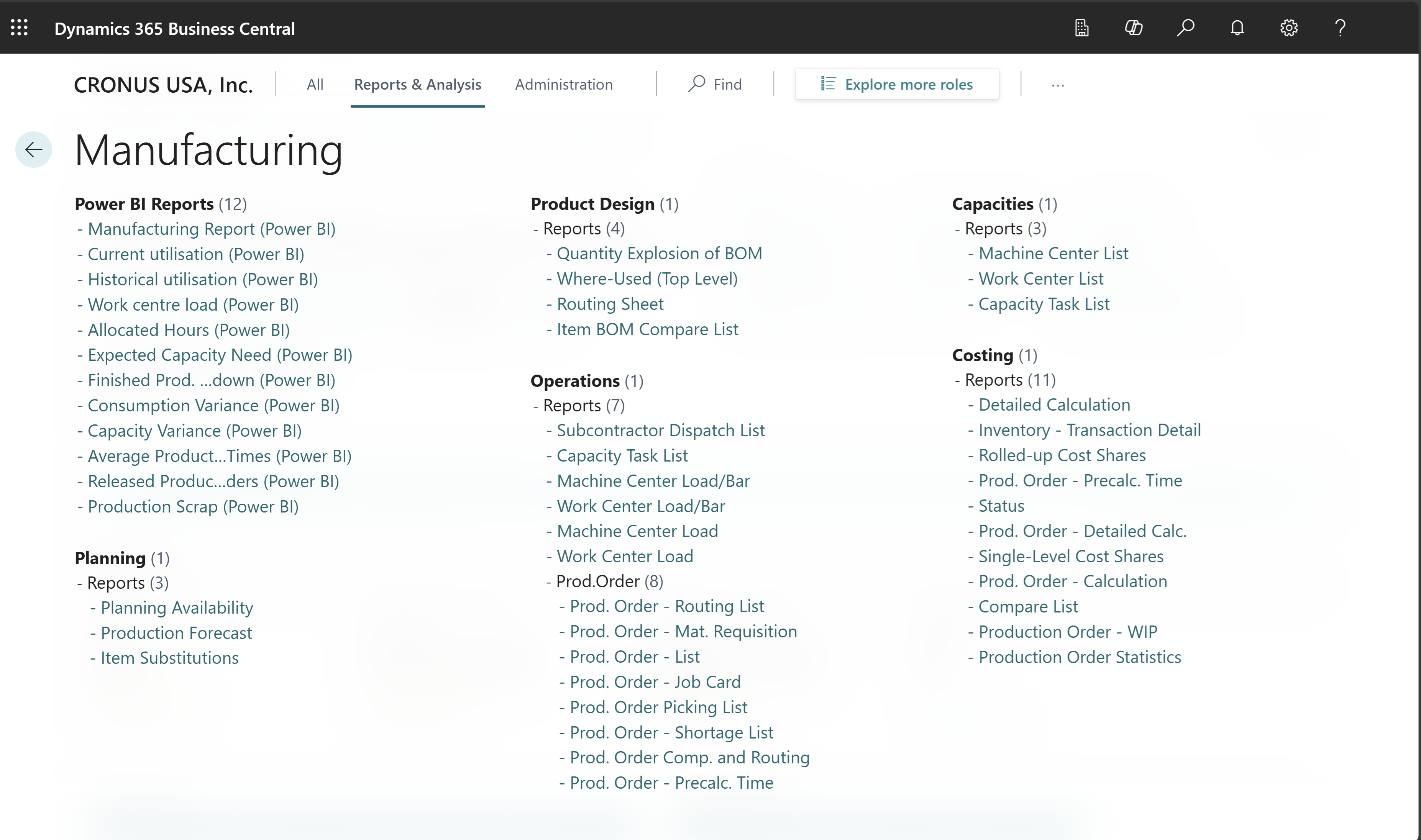
Learn more in Built-in production report overview.
On-screen manufacturing analytics
Business Central has several pages that give you manufacturing overviews and tasks to do, such as:
Print barcodes for finished goods on production orders
To remove a step or two from the process of tracking finished goods, Business Central offers a Print Label action on the Released Production Order and Finished Production Order pages. The action prints a report that includes the Item No., Description, Unit of Measure, and 1D and 2D barcode information from the orders. On the request page, you can also specify whether to print the Lot No., Serial No. or Package No. values as barcodes.
The report prints labels only for posted output entries that have a value for the selected item tracking type.
Note
Some printers and barcode/QR code formats require a specific implementation. You might need to upload a different Word template.
Check with your equipment supplier to learn how to print Word documents on your device.
If you decide to clone the report to create your own custom version, select Prod. Output Item Label in the Usage field on the Report Selection - Production page and enter your report's ID in the Report ID field.
Related information
Power BI Manufacturing app
View the load in work and machine centers
Built-in production report overview
Manufacturing overview