APPLIES TO: > APPLIES TO: Business Central 2022 release wave 1 and later
When a user gets an error message in Business Central while working in the application, the message includes a yes or no question as to whether the message was helpful, similar to the following illustration:
[Shows the error dialog and the voting actions, Yes and No, about the helpfulness of the message.]
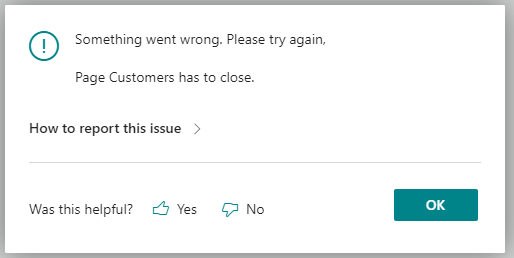
If a user selects either Yes or No, a signal is emitted and recorded in Azure Application Insights. This information can help partners and developers get insight into error messages that users find hard to understand. They can then follow up with the customer to help out.
This voting feature appears on all error messages that are thrown by calls to the Error(String) and Error(ErrorInfo) methods.
User gave feedback on error message
Occurs when a user selects either Yes or No to the question on the error dialog as to whether the message was helpful.
General dimensions
The following table explains the general dimensions included in the trace. The table lists the dimensions that are specific to Business Central.
| Dimension | Description or value |
|---|---|
| message | User gave feedback on error message: [OK|Not OK] |
| user_Id | The user telemetry ID for the user. From the user card, you can use user_Id to identify the user who triggered this telemetry event. Learn more in Assign a telemetry ID to users. |
Custom dimensions
The following table explains the custom dimensions included in the trace.
| Dimension | Description or value |
|---|---|
| eventId | CL0002 |
| aadTenantId | Specifies the Microsoft Entra tenant ID used for Microsoft Entra authentication. For on-premises, if you aren't using Microsoft Entra authentication, this value is common. |
| alObjectId | Specifies the page ID in the client context where feedback was submitted. For an error dialog, this value can be -1. |
| alObjectName | Specifies the page name in the client context where feedback was submitted, such as Dialog. |
| alObjectType | Page |
| alStackTrace | Specifies the stack trace in AL code for the error. |
| appId | Specifies the ID of the extension that threw the error. |
| appName | Specifies the name of the extension that threw the error. |
| appVersion | Specifies the version of the extension that threw the error. |
| component | Dynamics 365 Business Central Client |
| componentVersion | Specifies the version number of the component that emits telemetry (see the component dimension.) |
| environmentName | Specifies the name of the tenant environment. This dimension isn't included with Business Central on-premises. Learn more in Managing environments. |
| environmentType | Specifies the environment type for the tenant, such as Production, Sandbox, Trial. Learn more in Environment types. |
| errorMessage | Specifies the error shown to the user. |
| exceptionId | Specifies the GUID assigned to the error. |
| userFeedback | Specifies what the user voted, which can be either Yes or No. |
| userLocale | Specifies the regional language version of the message. The value is a language culture name, like en-US for English US and da-DK for Danish. |
| telemetrySchemaVersion | Specifies the version of the Business Central telemetry schema. |
Related information
Monitoring and Analyzing Telemetry
Enable Sending Telemetry to Application Insights