The Business Central deployment includes three core components for serving the application to users. It also includes various tools and components for managing, developing, extending, and testing the application.
Multi-Tier System Topology
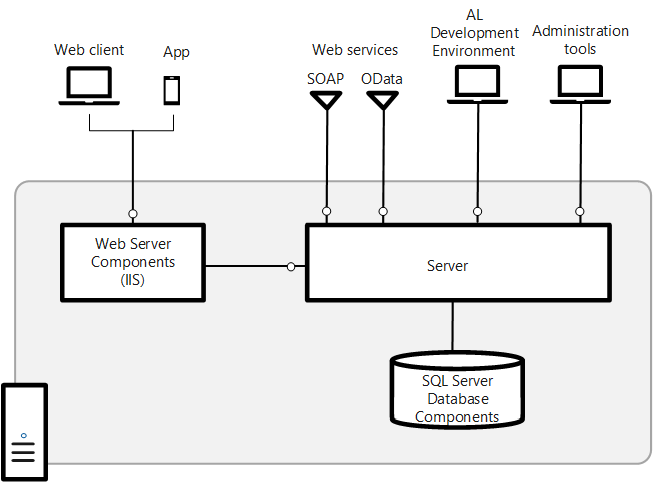
To understand the components is useful to first look at the base topology of a Business Central deployment, as illustrated in the following diagram:
Components
Main components
Every deployment must include the core components: Web server, Server, and SQL Database.
| Component | Description | More Information |
|---|---|---|
| SQL Database | A SQL database (SQL Server, SQL Server on Azure VM, Azure SQL Managed Instance, or Azure SQL Database) that contains application object definitions and business data. In a multitenant deployment, the application and business data are separated into different databases. In this case, a single application database can be associated with one or more tenants where the tenant database contains the business data. | Creating Databases Deploy a Business Central Database to Azure SQL Database |
| Server | Business Central Server is a .NET-based Microsoft service application that uses Windows Communication Framework to handle communication between clients and databases. It controls authentication, event logging, scheduled tasks, reporting, and more. | Configuring Business Central Server |
| Web Server | An Internet Information Server (IIS) web site, provisioned with the Business Central Web Server components, that enables access from the Business Central Web client and mobile apps. | Business Central Web Server |
| Business Central App | A desktop, phone, and tablet app for Business Central. | Get the Mobile App Get the Desktop App |
| Web services | SOAP and OData Web Services for exposing application functionality to external systems and users. Developers can create and publish functionality as web services. They expose pages, codeunits, or queries, and even enhance a page web service by using an extension codeunit. | Web Services |
Development and administration components
| Component | Description | More Information |
|---|---|---|
| AL development environment | An AL language extension for Visual Studio Code for developing applications and extensions. | Get Started with AL. |
| Business Central Administration Shell | Windows PowerShell modules for managing the deployment, including tasks such adding and configuring Business Central Server and Web server instances, databases, and users, and administering extension packages. | Windows PowerShell Cmdlets for Business Central |
| Business Central Server Administration tool | A Microsoft Management Console (MMC) for creating and configuring Business Central Server instances. | DISCONTINUED AFTER: Business Central 2022 release wave 1 (v20) Use Business Central Administration Shell instead. Business Central Server Administration Tool |
Additional components
| Component | Description | More Information |
|---|---|---|
| Demo Database | A database that contains application objects and sample business data for demonstration purposes. | |
| Dynamics NAV Development Environment | The C/SIDE client that was available in Business Central for developing applications using C/AL. In Business Central, this component is only required for doing upgrades but you can still use it to develop applications. | DISCONTINUED AFTER: Business Central Spring 2019 Development in C/AL in the Dynamics NAV Developer and IT Pro Help. |
| Dynamics NAV Development Shell | Windows PowerShell modules for merging and modifying application object files and creating extension packages. Installed with the Dynamics NAV Development Environment. | DISCONTINUED AFTER: Business Central Spring 2019 Windows PowerShell Cmdlets for Business Central |
| Dynamics NAV Client connected to Business Central | Windows Desktop application for accessing Business Central. | DISCONTINUED AFTER: Business Central Spring 2019 |
| Microsoft Outlook Integration | A Business Central Server component for integrating with Microsoft Outlook. | DISCONTINUED AFTER: Business Central Spring 2019 |
| Microsoft Outlook Add-in | A component to synchronize data, such as to-dos, contacts, and tasks, between Business Central and Outlook. The Outlook Add-In uses Business Central web services. | DISCONTINUED AFTER: Business Central 2020 Release Wave 1 |
| Microsoft Excel Add-in | A component that enables users to export data from Business Central to Excel. | DISCONTINUED AFTER: Business Central Spring 2019 |
| Excel Add-in | A component that enables users to export data from Business Central to Excel. | Setting up the Excel Add-In |
| Page Testability | A Business Central Server component for testing pages. | |
| Automated Data Capture System | A system that tracks the movement of items in a warehouse. | Use Automated Data Capture Systems (ADCS DISCONTINUED AFTER: Business Central 2019 Release Wave 1. The VT100 Plug-in is no longer included on the product installation media. |
| ClickOnce Installer Tools | Tools for implementing ClickOnce installation for the Dynamics NAV Client connected to Business Central. | DISCONTINUED AFTER: Business Central Spring 2019 Deploying Dynamics NAV Client Using ClickOnce. |
| NAS Service | A server component that executes business logic without a user interface or user interaction. NAS services in Business Central Server support applications such as Microsoft Outlook Integration and the Job Queue. | Instead of using NAS services, we recommend that you use the Task Scheduler (see Task Scheduler. If you decide to use NAS, and want to read more about its configuration, see Configuring NAS Services in the Dev and IT Pro Help for Microsoft Dynamics NAV 2018. |
Related information
Deployment
Installing Business Central Using Setup
Multitenant Deployment Architecture